About
Seed is Fenly's in-house design system, published under the MIT license so anyone building with React and Tailwind can use it.
Challenge
Turn a browser-only prototype (446 color tokens, 45 components, no types, no theming) into a system teams can install, theme and design with, without code and Figma drifting apart.
Impact
Turn a browser-only prototype (446 color tokens, 45 components, no types, no theming) into a system teams can install, theme and design with, without code and Figma drifting apart.
My role
Design system architecture
Visual and interaction design
React + Tailwind engineering
Docs, Figma library, governance
Team and timeline
Me as product designer and design engineer
Claude as AI pair (code, docs, Figma)
October 2026: prototype to npm and Figma in 5 days
100
Components documented in React and Figma
1,115
Figma variants bound to 528 variables
229
Automated tests, with axe in Light and Dark
0
Raw values in components, enforced by a lint
In short
One file,
tokens.json, generates CSS variables, a Tailwind v4 theme, DTCG JSON and the Figma variables.A theming engine builds an 11-step OKLCH scale from one brand color and moves tokens until every pair passes WCAG 2.2 AA.
Components sit on Radix Primitives behind Seed's own API, and the names match in Figma and code, so handoff needs no translation.
Docs,
llms.txtand a Claude plugin make Seed easy for AI assistants to use correctly.
What is Seed?
Seed is a free, MIT-licensed design system for React and Tailwind CSS with a matching Figma library. It gives teams true-gray surfaces, one accent they can theme, about 100 accessible components and tokens that work as Tailwind classes. It is also the interface of Fenly, so every product decision gets tested on a real app.
The starting point
Seed began inside Fenly's clickable prototype. It looked finished: 446 color tokens in Light and Dark, six type families, about 60 type styles and 45 components with READMEs. Underneath, it was a browser bundle. Components lived on window.Seed, styles on hand-written sd-* classes, and nothing could be installed, typed, tree-shaken or themed from an app.
Fenly helps teams manage their design systems, so its own system had to be the example: one source of truth, accessible by default and identical in design and code.
The objectives
1.
One source of truth
Every value lives once and is generated into each format, so design and code cannot disagree.
2.
Accessible is the baseline
Contrast checked in Light and Dark for every theme, and axe on every component in CI.
3.
Your brand from one color
A team should re-theme the whole system with one brand color without breaking a single contrast pair.
4.
The same names everywhere
A fill bound to bg-accent-solid in Figma is the bg-accent-solid class in React.
5.
Ready for AI
Assistants should build with Seed correctly, so the docs are written for people and for models.
The solution
Six decisions shaped Seed. Each one removes a place where design and code could drift.
1. A neutral-first palette where the user's work is the subject
Fenly shows other people's colors all day, so its own surfaces had to step back. I tested Slate, Zinc and a true Neutral gray on the real Tokens screen, in Light and Dark. Tinted grays fought with the swatches; true gray let them read accurately. To keep every semantic token an alias, I added a 14-step graphite scale for the dark surfaces that had no primitive, so all 155 semantic tokens point to a primitive and no hex is left.

2. A theming engine that checks its own contrast
Give createTheme() one brand color and it builds an 11-step OKLCH scale with that exact color at its step. Then it runs 22 checks: every accent token against WCAG 2.2 AA, in Light and Dark. A token that fails moves along the scale until it passes. Light brands like yellow or lime keep their color on buttons and switch to near-black text.
The checks paid for themselves on day one by catching two bugs in Seed's own defaults:
bg-accent-solid
blue-500 · 3.6:1
blue-600 · passes AA
text-accent-primary
blue-400 · 4.0:1
blue-300 · passes AA
3. Radix underneath, Seed's own API on top
Accessibility behavior (focus, keyboard, ARIA) comes from Radix Primitives, so I could spend design time on the API and the details. Variants use cva, icon props take elements so server components can pass them, and display parts like Badge, Card or Skeleton are server-safe. Every Seed token is also a Tailwind class.
# install
npm i @flinbu/seed
/* app.css */
@import "@flinbu/seed/styles.css";
// any component
import { Button } from "@flinbu/seed";
<Button leftIcon={<Plus />}>New token</Button>
<div className="bg-secondary p-base rounded-control">…</div>
4. Calm by default, color spent on meaning
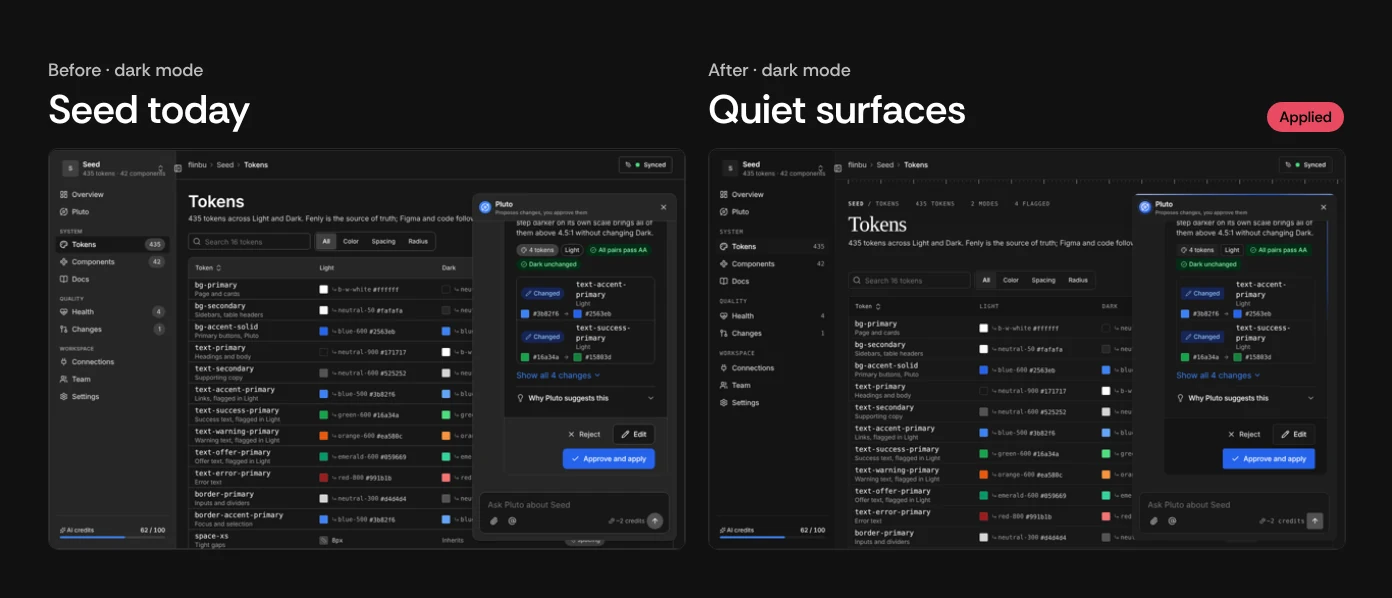
Seed's UI principles are short: calm by default, color is spent on meaning, tokens never raw values. In Dark mode that meant quieter surfaces, fewer borders and one accent reserved for the action that matters, like approving a change the AI assistant proposes.
5. A Figma library built from the same tokens, with zero raw values
The Figma file is generated from the published tokens, not drawn by eye. 317 primitives stay hidden; 155 semantic colors alias them with Light and Dark modes and are scoped by role. Spacing, size and radius are number variables, type is 53 text styles bound to font variables, and 92 Lucide icons swap in as instances.
Every one of the 142 component sets was scanned for raw values and checked in Dark. When Figma could not express a value, I flagged it as a missing token instead of hardcoding it.
6. Docs that theme themselves, written for people and for AI
The docs site is built with Seed, in Seed's style. Each component has a live example, its code, a props table and accessibility notes. The theme builder has a "Try it on this site" switch that re-themes the docs you are reading, which turned out to be the fastest way to explain theming.
For AI, the docs publish an llms.txt, and the repo ships a Claude plugin with the component catalog, tokens, writing rules and accessibility checklist. Releases go out through Changesets and npm trusted publishing, with no tokens stored anywhere.
Before and after
Prototype bundle
Seed today
Install
Copy a script tag
npm, typed, tree-shakeable
Components
45
100, on Radix Primitives
Theming
Edit CSS by hand
One brand color, AA-checked
Tailwind
Separate sd-* classes
Every token is a utility
Figma
None
528 variables, 1,115 variants
Quality gates
Manual review
229 tests, axe, raw-value lint
Challenges
Figma can't express everything code can. Opacity, negative spacing, focus ring offsets and container widths have no variable to bind to. The easy fix was to type the number in; the right fix was to keep a list of every gap as a missing token, so the next release closes it in both places at once. The same rule shaped typography: Seed's serif, Fenly Serif, is its own open font built from Literata, so it ships with the package instead of depending on a service.
Learned lessons
Automate the rule, not the reminder. A lint that fails on raw values and contrast checks that run on every theme did more for consistency than any guideline page. And an AI pair moves fast only when the system has guardrails: one source of truth, tests and scans are what made it safe to build this much, this quickly.
Frequently asked questions
Is Seed free to use?
How do I install Seed in a React app?
How is Seed different from shadcn/ui?
Can I use my own brand color?
How was AI used to build Seed?
Try Seed in your next project
Read the docs, star the repo or duplicate the Figma library.